

Time to fill counts the days from the requisition being approved to the offer being accepted. Time to hire counts the days from a candidate entering the pipeline to that same acceptance. Time to fill measures the role and the process around it. Time to hire measures how fast candidates move once they exist. Track both, because a long time to fill with a short time to hire means the delay is before recruiting even starts.
Key takeaways:
- Time to fill = offer accepted date minus requisition approved date.
- Time to hire = offer accepted date minus the date the candidate entered the pipeline.
- Report time to fill to leadership and finance. Report time to hire to recruiters and hiring managers.
- The gap between the two numbers is the sourcing and approval delay, and it is usually where the biggest fix is.
Most recruiting teams report one of these numbers and call it the other. Recruiterflow's guide makes the split clear: time to fill is about how long the company takes to fill a role, and time to hire is about the candidate's journey through the process (Recruiterflow). This post gives both formulas with a worked example, shows where each one gets stuck, lists benchmarks by industry, and says which number to put in front of which audience.
Time to fill vs time to hire at a glance: definition, start point, end point, owner
| Time to fill | Time to hire | |
|---|---|---|
| Measures | How long a role stays open | How fast a candidate moves through the process |
| Starts | Requisition approved (or job posted) | Candidate enters the pipeline (applies or is sourced) |
| Ends | Offer accepted | Offer accepted |
| Owner | Talent acquisition leader, finance | Recruiter, hiring manager |
| A long number means | Approval, sourcing or job marketing delay | Screening, interview or decision delay |
| Use it to | Plan headcount and budget | Fix the pipeline |
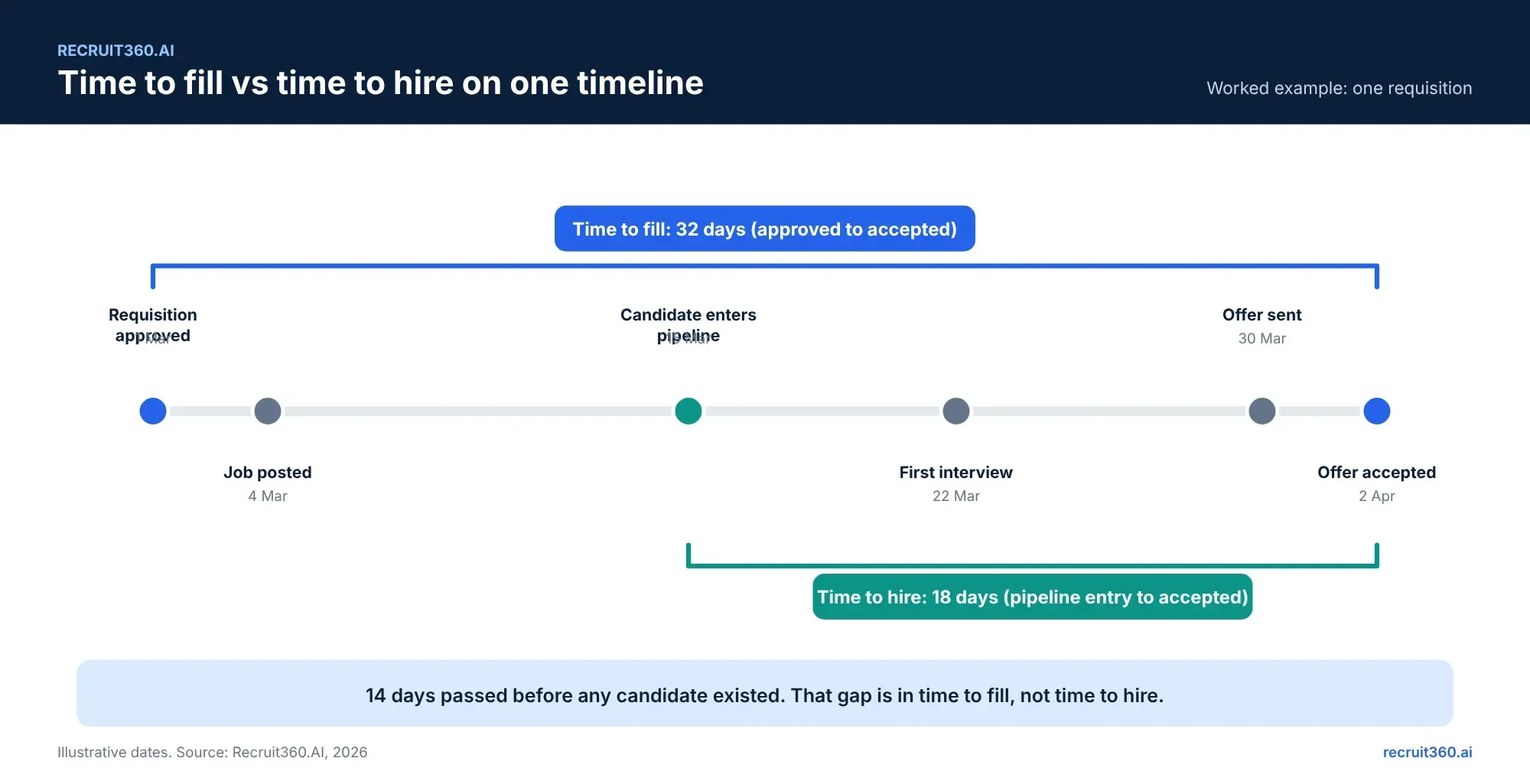
What time to fill measures: requisition approval to accepted offer
Time to fill is the organisation's number. It starts the day the requisition is approved and ends the day the candidate says yes. Everything in between counts: the days the job sat unposted, the sourcing, the screening, the interviews, the offer.
Time to fill formula with a worked example
Time to fill = Date offer accepted − Date requisition approved
A requisition is approved on 1 March. The job is posted on 4 March. The first candidate enters the pipeline on 15 March. The offer is accepted on 2 April. Time to fill is 32 days. Average time to fill across roles is the sum of each role's days divided by the number of roles filled.
Where time to fill gets stuck
Before a candidate exists. The requisition waits for a second approver. The job description is rewritten twice. The posting goes to two boards instead of six. In the example above, 14 of the 32 days passed before anyone was in the pipeline. That is time to fill's problem alone.
What time to hire measures: first contact to accepted offer
Time to hire is the candidate's number. It starts when the person enters your pipeline and ends when they accept. It ignores the approval and posting delay, which is why it is the better measure of the recruiting process itself.
Time to hire formula with a worked example
Time to hire = Date offer accepted − Date candidate entered pipeline
Same role. The hired candidate entered the pipeline on 15 March and accepted on 2 April. Time to hire is 18 days. Across a quarter, add the days for every hire and divide by the number of hires.
Where time to hire gets stuck
Inside the pipeline. Resumes wait for a recruiter with a free afternoon. Interview feedback sits in chat. The hiring manager takes a week to decide between two finalists. The offer waits for a signature. Each of those is a stage with a date, which is how a recruitment management system shows you where the days go.
Average time to fill and time to hire by industry: benchmarks and notice periods
Benchmarks vary by source, year and region, so use them as a range rather than a target. The most-cited industry breakdown comes from the Josh Bersin Company and AMS time-to-hire research, which iProspectCheck summarises as follows (iProspectCheck).
| Industry | Average time to hire (days) | Note |
|---|---|---|
| Energy and defense | 67 | Longest; clearance and compliance steps |
| Professional services | 47 | Multi-round interviews |
| Tech and media | 20 | Shorter loops, more competition |
| Retail | 14 | Shortest; high volume, fewer stages |
[Before publishing: replace or add the current-year figures from the primary Bersin/AMS report or SHRM's latest benchmarking, with the year stated. The table above is from a secondary summary of 2022 data with 2023 projections.]
Your own number matters more than the industry one. Measure it by department for a quarter, then compare against your own last quarter.
Which metric to report, and to whom
Report time to fill to leadership and finance
Leadership wants to know how long a seat stays empty, because an empty seat is lost output and budget. Time to fill answers that. Report it by department, with the trend, not a single number.
Report time to hire to recruiters and hiring managers
The recruiting team wants to know how fast the pipeline moves once there are candidates in it. Time to hire answers that, and it is the number they can act on this week.
Track both to find the real bottleneck
If time to fill is 60 days and time to hire is 20, the problem is before recruiting starts: approvals, job descriptions, posting, sourcing. If both are 45, the problem is inside the pipeline. The gap tells you where to look.
How to reduce time to fill and time to hire: six fixes across approval, screening, feedback and scheduling
Six fixes, one per stage where the days go.
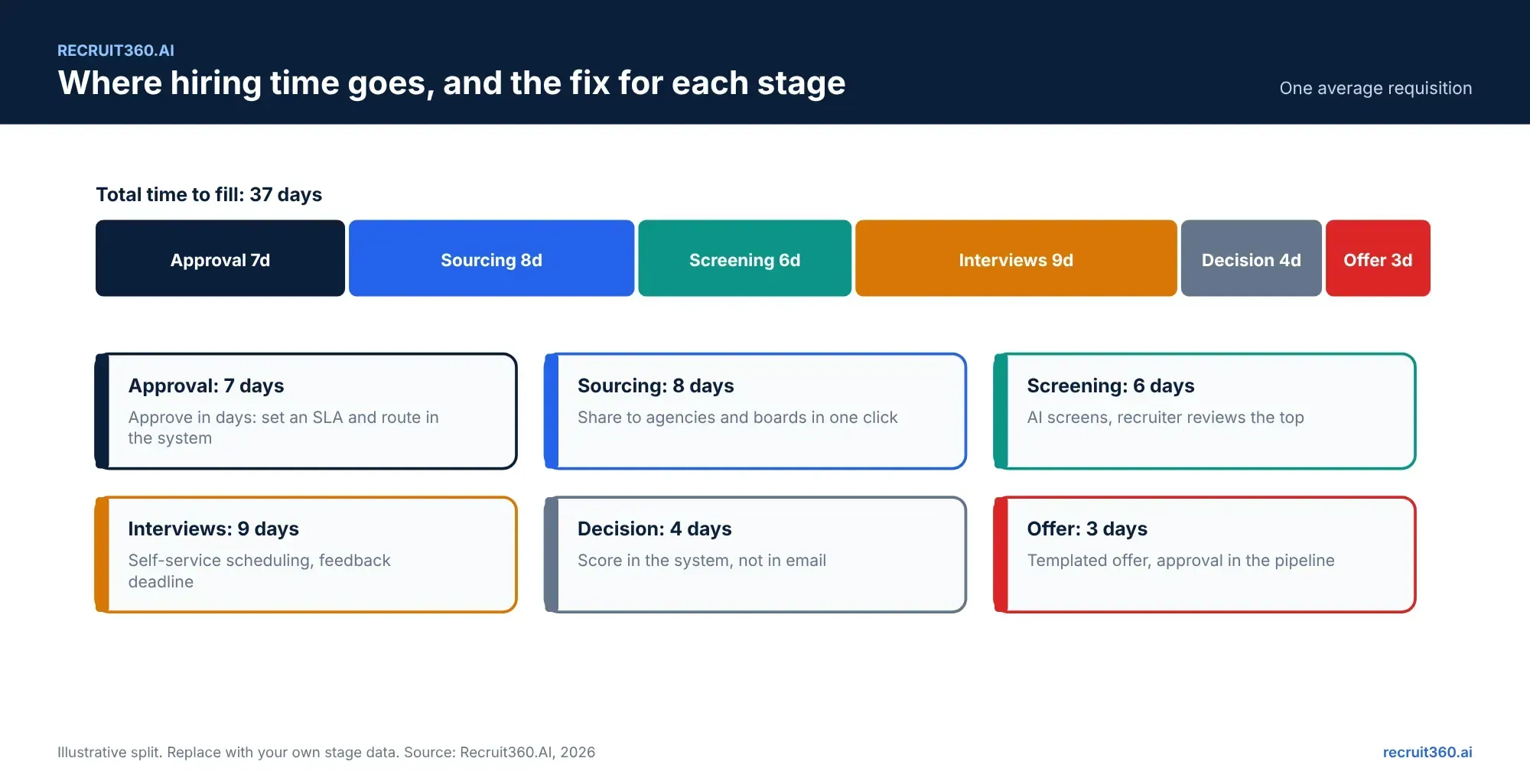
1. Approve requisitions in days, not weeks
Route approvals inside the system with a reminder after 48 hours. Set an approval SLA and report against it. This is the single largest cut to time to fill for most teams.
2. Screen with AI matching, AI interviews and agent calling, decide with people
AI screening ranks every resume before the recruiter opens the role, so the shortlist exists on day one. The recruiter reviews the top and decides. Our guide to AI resume screening covers the pipeline.
3. Give hiring managers a deadline for feedback
Two business days after each interview. The system reminds them. Feedback that takes a week adds a week to time to hire for every candidate in that round.
4. Self-service interview scheduling
Candidates pick a slot from the interviewer's shared availability. The three-email loop to find a time disappears. See the recruitment automation guide for the other hand-offs worth automating.
5. One pipeline for agency and direct candidates
Agency submissions through a vendor portal land in the same pipeline with the same scoring. No uploading attachments, no duplicate disputes, no separate list to merge.
6. Report weekly, by stage, from the recruitment analytics dashboard
A weekly view of candidates per stage and days in stage shows the bottleneck while it is still fixable. A monthly average hides it.
What these metrics mean for each role
Corporate recruiters
Time to hire is your number. Watch days in stage every week. The stage that grows is the one to fix, and it is usually feedback or scheduling, not sourcing.
Hiring managers
You own two of the longest stages: requisition approval and interview feedback. A two-day feedback rule cuts more days than any sourcing change a recruiter can make.
HR and talent acquisition leaders
Report time to fill by department to leadership, with the trend. Keep time to hire for the team. When the gap between them grows, the fix is in approvals and posting, not in recruiting.
IT and HRIS admins
Both metrics depend on dates the system captures: requisition approved, candidate entered pipeline, offer accepted. If any of those is typed by hand or lives in another tool, the metric is a guess. Confirm the three fields exist and are set by the workflow, not by a person.
Frequently asked questions
What is the difference between time to fill and time to hire?
Time to fill starts when the requisition is approved. Time to hire starts when the candidate enters the pipeline. Both end when the offer is accepted. Time to fill measures the role; time to hire measures the candidate's journey.
What is a good time to fill?
It depends on the role and industry. Published benchmarks range from about two weeks in retail to over two months in regulated industries. Your own last quarter is the better comparison.
How do you calculate time to hire?
Subtract the date the hired candidate entered your pipeline from the date they accepted the offer. For an average, add the days for every hire in a period and divide by the number of hires.
Why is my time to fill long but time to hire short?
Because the delay is before candidates exist: requisition approval, job description, posting or sourcing. The pipeline is fast once it has people in it. Fix the front of the process.
Does an RMS track both metrics automatically?
Yes, if the three dates are captured by the workflow. A recruitment management system timestamps requisition approval, pipeline entry and offer acceptance, so both metrics appear on the dashboard without a spreadsheet. Recruit360.AI reports both by department and by agency.